Order Services
Services are the core of the platform—used to initiate screenings, verifications, and other actions for individuals. When you order a service, the participant receives an authorization form by email and/or text. You can also access this form at any time by selecting the service from the table. For certain services, the authorization includes a barcode that must be presented at the clinic.
Order A Service
You can order new services by clicking the Order Services button on the top left of the table or the Order a Service button at the top of the navigation bar.

Choose Service and Location
Next, select your test, and choose a clinic using our zip code based search.


Choose or Create Participant
Choose an existing person for your test, or create a new one.

Add-ons
Finally, review your order and choose any add-ons you'd like to include. To add an option, click the corresponding radio button or checkbox.

Last, confirm your order. After it's processed, your service(s) is tracked in GLASS, every step of the way.

Resending Authorizations and Changing Clinics
After finding the desired service, click anywhere on the row to view the service modal. From there, you can choose either Resend Only or Change Clinic and Resend.


View Service Status
The badge in the status column indicates your service item's current state. You can hover over the badge to see a tooltip with more details about what it means.

Service Status Definitions
Each service displays a status badge indicating its current state. Below are some of the most common statuses you may encounter.
Drug Testing & Other Clinic Services
| Status | Definition |
|---|---|
| Auth Created | The authorization and barcode for this service are now available. |
| Auth Modified | The authorization and barcode for this service have been modified. |
| Auth Canceled | This authorization has been canceled. |
| Collection Completed | The specimen was collected successfully and is being transferred to the laboratory for testing. |
| Sent to MRO for Review | Lab testing has been completed. Our MRO (a physician) is now reviewing and preparing the final report. |
| Results Posted | Results for this test have been posted. |
Background Checks
| Status | Definition |
|---|---|
| Waiver Sent | We have sent the background waiver to this person. Once it is signed electronically, we will immediately create their profile and begin the background investigation. |
| Waiver Received | We have received the waiver from the person on whom you have requested a background check. This means we can transmit and create their profile and begin the investigation. |
| Profile Transmitted | The background check profile has been transmitted and will be created shortly. Depending on the services you ordered, the investigation may take a few hours (e.g., database searches) or a few days (e.g., court repositories in certain states). |
| Results Posted | Background check results have been posted. |
Frequently Asked Questions
I ordered a service. What happens next?
The participant will receive an email and/or text with the authorization form. You can also access the form by clicking on its service row on the table. For certain tests, the authorization contains a barcode that the participant will need to bring to the clinic.
The service I ordered is not showing up in the table. What should I do?
Please allow up to 5 minutes for the service to be processed and refresh the page.
How do I order new services?
You can order new services by clicking the Order Services button on the top left of the table or the Order a Service button at the top of the navigation bar.

How can I resend authorizations?
After finding the desired service, click anywhere on the row to the view the service modal. From there, press the Resend Only button.
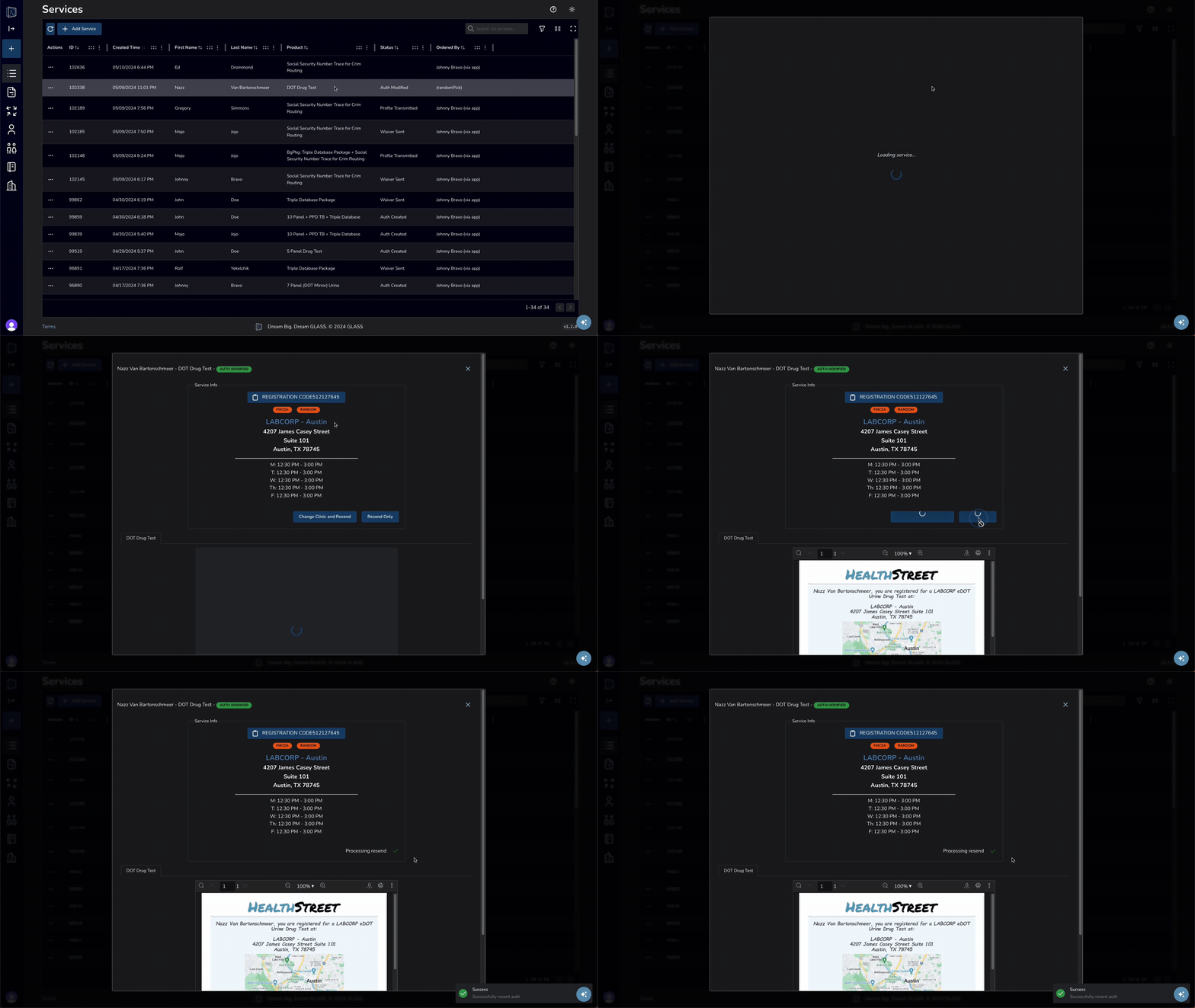
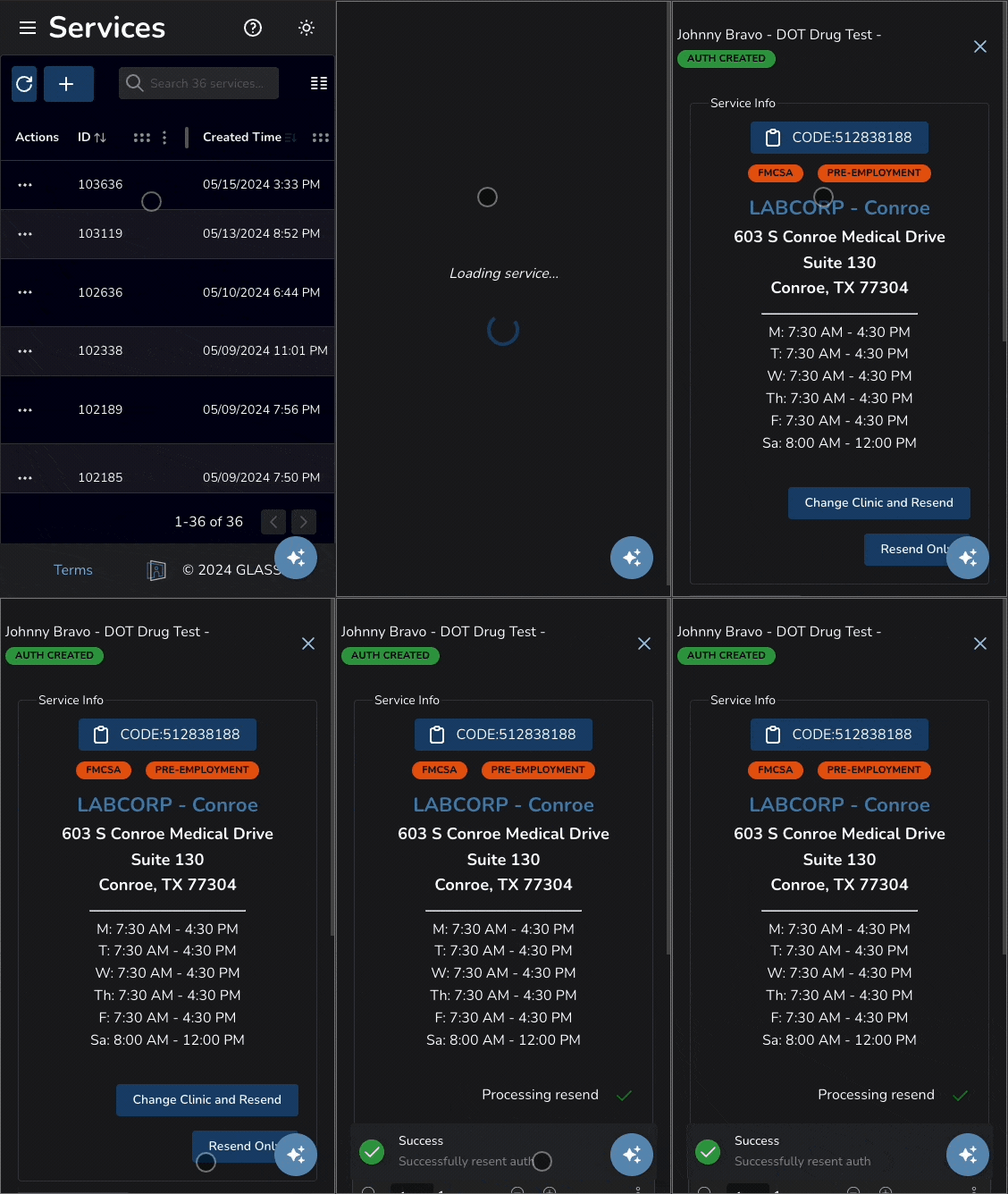
Click to enlarge
How do I know if my results have posted?
If your results are available, your service will read Results Posted In the tables status column. You can click on the row to view the results.
What if I create a service for the wrong person, can I change it?
Please contact support for help.
Our customer service center is available to assist you with any questions or concerns you may have regarding your services.
You can reach us by phone M-F 8am-7pm EST at (888) 378-2499, or email us anytime at staff@health-street.net.
My results haven't posted yet? What should I do?
Please bear in mind that turnaround for lab results may vary based on test type and testing volume.
