Verify Identity
Health Street's Identification uses facial recognition and ID scanning technology to verify a person's identity. This gives you confidence that the person you're screening is exactly who they claim to be, helping protect you from identity fraud.
Navigate to Photo IDs Table
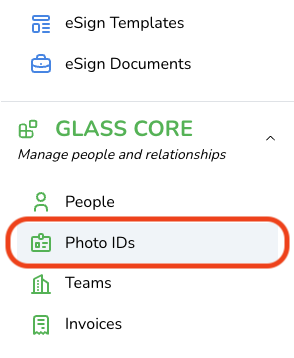
To open the Photo IDs table, click Photo IDs in the navigation menu.
Request Identity Verification
You can order a Photo ID Verification by clicking the Request Photo ID Verification button at the top left of the table, or by clicking Identity from the Overview tab of an individual Person record.


Next, you'll arrive at a picker, which allows you to select any additional people whose identities you want to verify. Once you've made your selection(s), click the Checkout button at the bottom right of the picker.

Resend ID Verification Request
Click the table row for the Photo ID Verification request that you want to resend.

Next, click the Resend Link button to resend the Photo ID Verification request.

Update Person Record from Photo ID
If the Photo ID scan detects missing information or fields that differ from the Person record, those fields will appear at the top of the Photo ID record, showing both the current person record value and the value captured from the ID.

Review the selected fields, uncheck any fields you do not want to update, then click Update Person to apply the changes to the person record.

Frequently Asked Questions
What is an Identification?
Health Street's Identification uses facial recognition and ID scanning technology to verify a person's identity. This gives you confidence that the person you're screening is exactly who they claim to be, helping protect you from identity fraud.
How does Identification work?
1. Instant Identification Request – Send a secure request link to any individual via email or SMS to begin the verification process.
2. Capture & Analyze ID – The user captures high-resolution images of their government-issued ID (front and back). Health Street's system checks for authenticity, tampering, and document integrity.
3. Extract & Validate Data – The barcode on the ID is scanned to extract official data, verifying consistency and detecting expired or forged IDs.
4. Selfie Matching & Final Report – The barcode on the ID is scanned to extract official data, verifying consistency and detecting expired or forged IDs.
The data extracted from the ID as well as the anti-spoofing score, remain avialable as Identification records for you to review at any time.
What is an anti-spoofing score?
The anti-spoofing score (1–100) indicates how well the live selfie passed checks confirming it's a genuine, 3D capture of a real face.
What if the submitted ID is expired?
If the scanned identification document has expired, we will indicate as much with a red badge on the Identification results. Health Street will still provide an anti-spoofing score.
