Health Street Logo in stylized text
  • Locations
  • Login
location_pin Locations  login Login 
  • Drug Tests
    • Urine Drug Testing
      • 5 Panel Drug Test
      • 10 Panel Drug Test
      • 12 Panel Drug Test
    • DOT Drug Testing
      • Random Pool
    • Saliva Drug Tests
    • Hair Drug Tests
    • Alcohol Tests
      • Urine Alcohol Tests
      • Breath Alcohol Tests
    • Drugs Tested
    • Drug Test Panels
  • DNA Tests
    • Paternity Testing
      • Legal Paternity Test
      • Home DNA Test Kit
    • Sibling DNA Test
    • Aunt or Uncle DNA Test
    • Grandparent DNA Test
    • Postmortem DNA Test
    • Hair DNA Test
    • Alternative DNA Test
  • Background Check
    • Triple Database Package
    • Court Record Package
    • Platinum Package
    • Ultimate Package
    • Resume Verification
    • DOT Background Check
  • Occupational Health
    • Antibody Testing
    • Biometrics
    • Employment Physical
    • Respiratory Health Exam
    • Tuberculosis (TB) Testing
    • Vaccines
    • Vision and Hearing
  • Resources
    • Drug & DNA Testing by State
    • Background Checks by State
    • Occ Health by State
    • GLASS App
    • Blog
    • FAQs
    • Industries
    • Marijuana Compliance
    • State Laws Compliance

Manage Random Testing

  • Home
  • chevron_right
  • Knowledge Base
  • chevron_right
  • Manage Random Testing

A Random Pool is a group of employees enrolled in a randomized testing program, typically for drug or alcohol screening. Individuals in the pool are selected at random intervals to ensure compliance with company policies or regulatory requirements.


Set Up a Random Testing Pool

First, click on the row for the Team you want to select, then click the Setup Random Pool button in the bottom right corner of the modal.

Highlighted entry for Transportation Logistics team in a list of teams.

User interface for editing organization details with fields for company information, contact information, and location. A highlighted button labeled 'Setup Random Pool' is visible.

Frequently Asked Questions

Where can I check the status of my employees random tests?

Please refer to the services page to check the status of random tests.

What is a covered employee?

Covered employees are those eligible to be selected for random testing. In other words, they are the pool from which random testing selections are made for a given month.

What is a random employee?

Random employees are those who were selected for random testing. Appropriate services are created for each chosen employee.

Can I swap a selected employee for another?

Please contact support for help.

Our customer service center is available to assist you with any questions or concerns you may have regarding your services.

You can reach us by phone M-F 8am-7pm EST at (888) 378-2499, or email us anytime at staff@health-street.net.

How can I set up a Random Pool for my Organization?

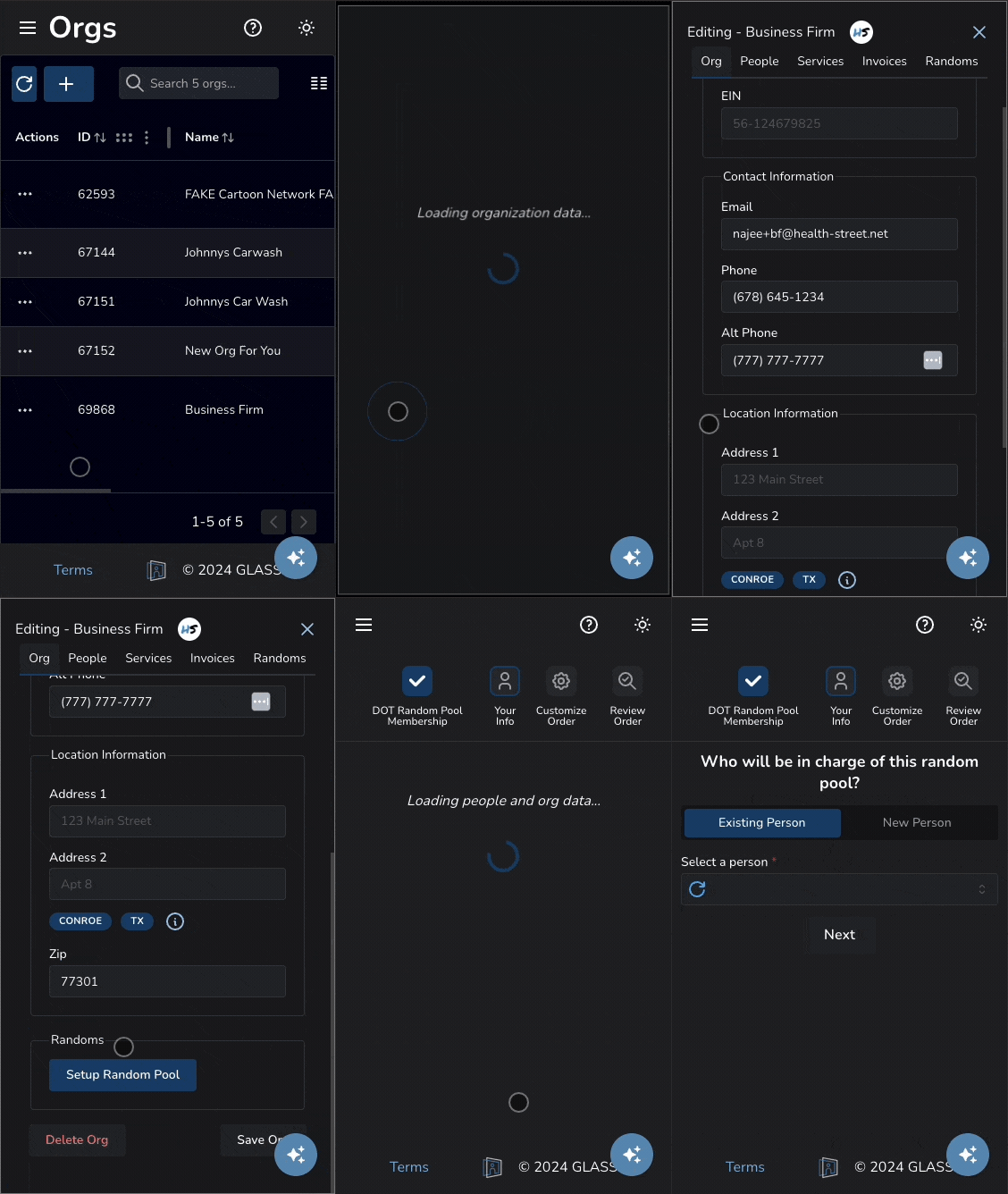
First, click on the row for the Organization you want to select, then click the Setup Random Pool button in the bottom right corner of the modal.
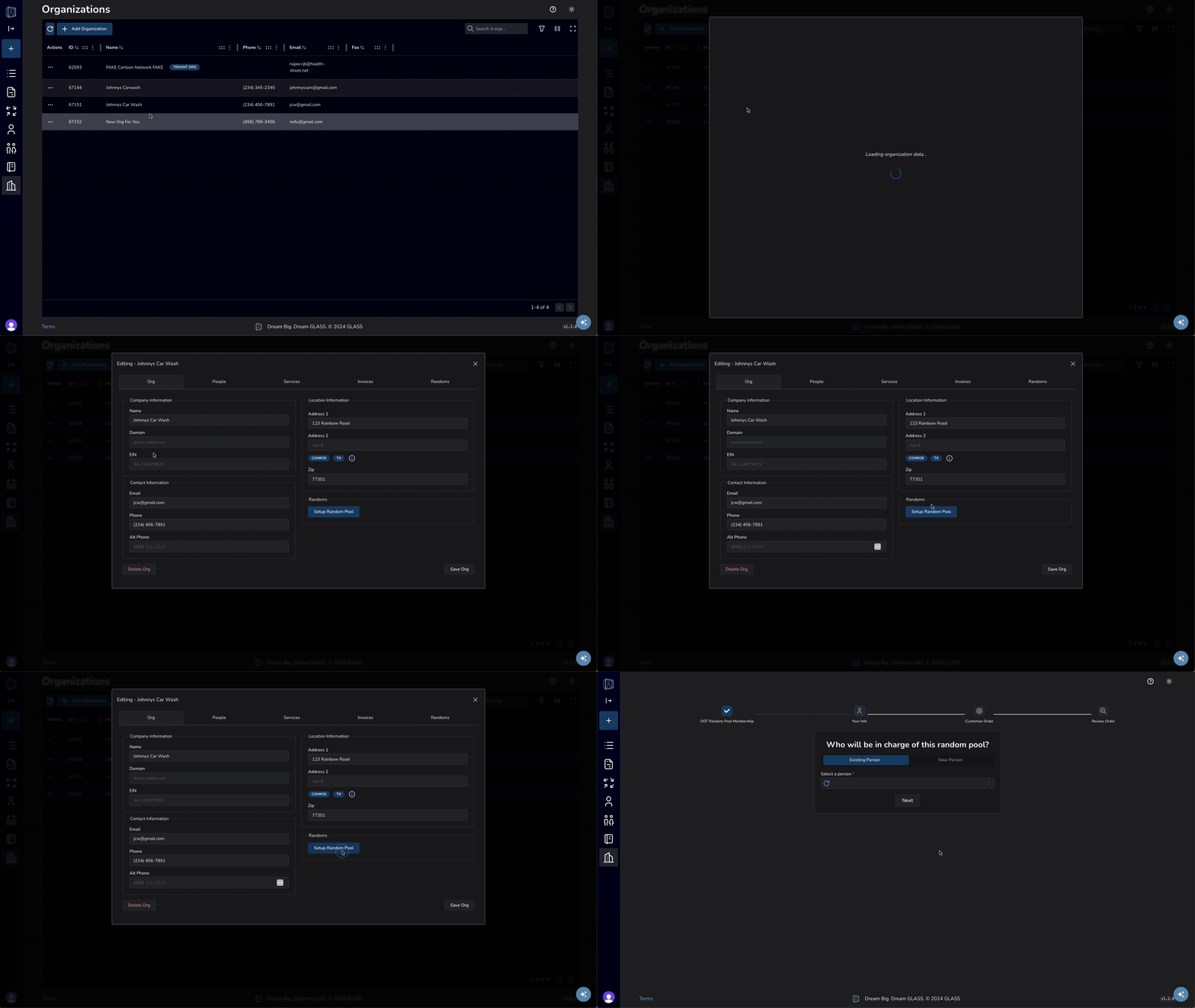
Updating a Person on Desktop
Updating a Person on mobile

Click to enlarge

Are there month and employee specific Random Pool table views?

From the Random Pool table, click on a month's row for a more detailed view of its' information. From there, click on employee's row for a table view showing random pool selection history for that specific employee.

You can navigate to the previous table by clicking "Back to Randoms" or "Back" at the table's top-left corner.

Accessing additional Random Pool Table Views
Updating a Person on mobile

Click to enlarge

Click to enlarge

Categories icon

Knowledge Base

  • folder_open Sign Documents
  • folder_open Share Files
  • folder_open Verify Identity
  • folder_open Billing & Payments
  • folder_open Manage Teams
  • folder_open Manage People
  • folder_open Manage Random Testing
    • arrow_right_alt Set Up a Random Testing Pool
  • folder_open Order Services
  • folder_open Manage Users
  • Clinic Locations
  • About Us
  • Blog
  • FAQ
  • API
  • Privacy
  • Sitemap
  • Terms & Conditions
  • Contact
© 2026 Health Street
  • About Us
  • API
Privacy Policy | Sitemap | XML Sitemap | Terms & Conditions | Contact Us |
© 2025 Health Street