Health Street Logo in stylized text
  • Locations
  • Login
location_pin Locations  login Login 
  • Drug Tests
    • Urine Drug Testing
      • 5 Panel Drug Test
      • 10 Panel Drug Test
      • 12 Panel Drug Test
    • DOT Drug Testing
      • Random Pool
    • Saliva Drug Tests
    • Hair Drug Tests
    • Alcohol Tests
      • Urine Alcohol Tests
      • Breath Alcohol Tests
    • Drugs Tested
    • Drug Test Panels
  • DNA Tests
    • Paternity Testing
      • Legal Paternity Test
      • Home DNA Test Kit
    • Sibling DNA Test
    • Aunt or Uncle DNA Test
    • Grandparent DNA Test
    • Postmortem DNA Test
    • Hair DNA Test
    • Alternative DNA Test
  • Background Check
    • Triple Database Package
    • Court Record Package
    • Platinum Package
    • Ultimate Package
    • Resume Verification
    • DOT Background Check
  • Occupational Health
    • Antibody Testing
    • Biometrics
    • Employment Physical
    • Respiratory Health Exam
    • Tuberculosis (TB) Testing
    • Vaccines
    • Vision and Hearing
  • Resources
    • Drug & DNA Testing by State
    • Background Checks by State
    • Occ Health by State
    • GLASS App
    • Blog
    • FAQs
    • Industries
    • Marijuana Compliance
    • State Laws Compliance
  • Home
  • chevron_right
  • Knowledge Base
  • chevron_right
  • Payment and Billing

Payment and Billing

Payment and Billing allows you to securely manage payments for services ordered within the app and settle invoices as needed. All transactions and billing records are organized within GLASS, giving you clear visibility into your payment history and outstanding balances in one place.


View Invoice

To view an invoice as a PDF, click the icon on the appropriate row. To view an invoice as an interactive data table, click on the row itself.

Invoice interface showing March 2026 invoice from Northbridge Solutions marked as due with a PDF download icon highlighted.

Pay Invoice

Navigate to the Invoices table, and click the Pay Now button on the row of the Invoice you wish to pay.

Invoice interface showing a due payment of $1,106.00 for Northbridge Solutions with a 'Pay now' button highlighted.

Online payment form for GLASS invoice with fields for card number, cardholder name, expiration date, CVC, and ZIP code.

Frequently Asked Questions

How long do I have to pay my invoices?

Invoices are due within 30 days of the invoice date. After this period, late fees will be applied.

How can I view my invoice?

To view an invoice as a PDF, click the icon on the appropriate row. To view an invoice as an interactive data table, click on the row itself.

Accessing additional Random Pool Table Views
Updating a Person on mobile
Where can I mail a check?

Health Street
155 Water Street
Brooklyn, NY 11201

What is your AHC/Wire information?

ACH instructions will be provided upon request.

Can I pay my invoice using the GLASS app?

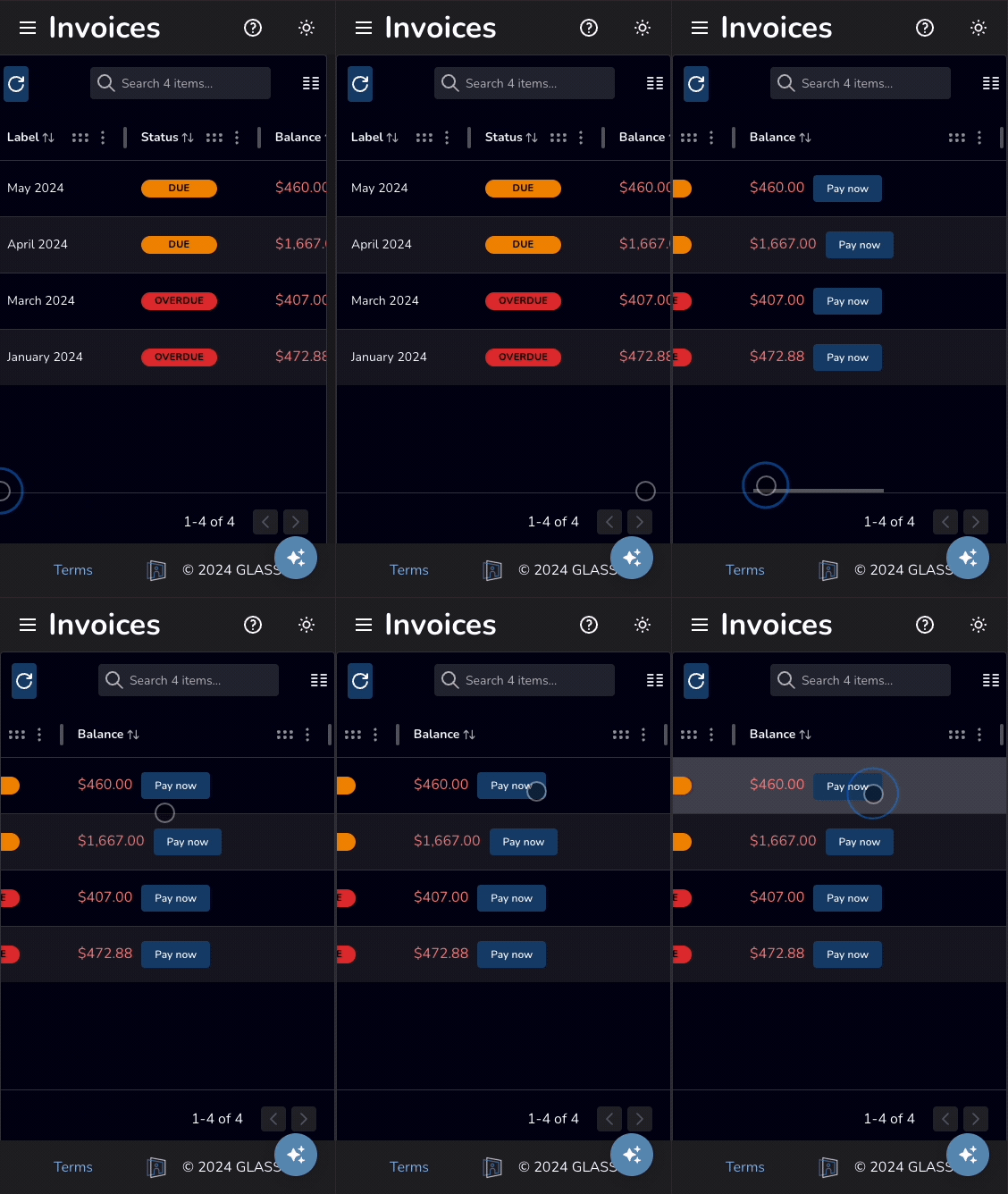
Yes! Simply navigate to the Invoices table, and click the Pay Now button on the row of the Invoice you wish to pay.
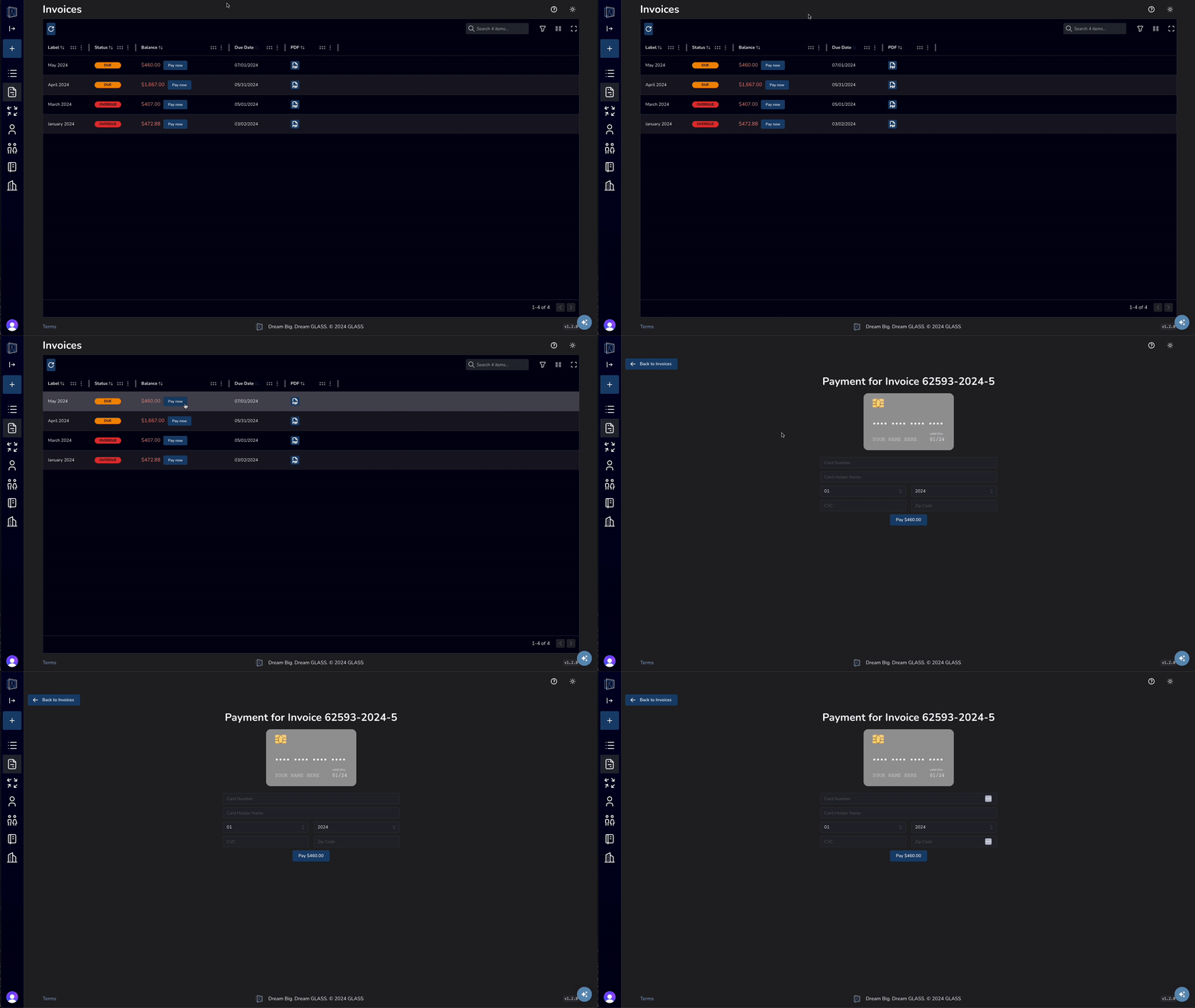
How to pay an invoice on desktop GLASS app
How to pay an invoice on mobile GLASS app

Click to enlarge

Categories icon

Knowledge Base

  • folder_open Sign Documents
  • folder_open Share Files
  • folder_open Verify Identity
  • folder_open Billing & Payments
    • arrow_right_alt View Invoice
    • arrow_right_alt Pay Invoice
  • folder_open Manage Teams
  • folder_open Manage People
  • folder_open Manage Random Testing
  • folder_open Order Services
  • folder_open Manage Users
  • Clinic Locations
  • About Us
  • Blog
  • FAQ
  • API
  • Privacy
  • Sitemap
  • Terms & Conditions
  • Contact
© 2026 Health Street
  • About Us
  • API
Privacy Policy | Sitemap | XML Sitemap | Terms & Conditions | Contact Us |
© 2025 Health Street